Manage Agents
Agents are the local runtimes that open outbound connections to Tunely and reach the published services in your own environment.
Common Tasks
| Task | Result |
|---|---|
| Create agent | The dashboard issues an agent token for a new installation. |
| Copy token | The token is used in Docker, Home Assistant, or another module. |
| Check status | The UI shows whether the agent is connected and recently reported. |
| Remove agent | The related installation can no longer fetch configuration. |
Agent Summary
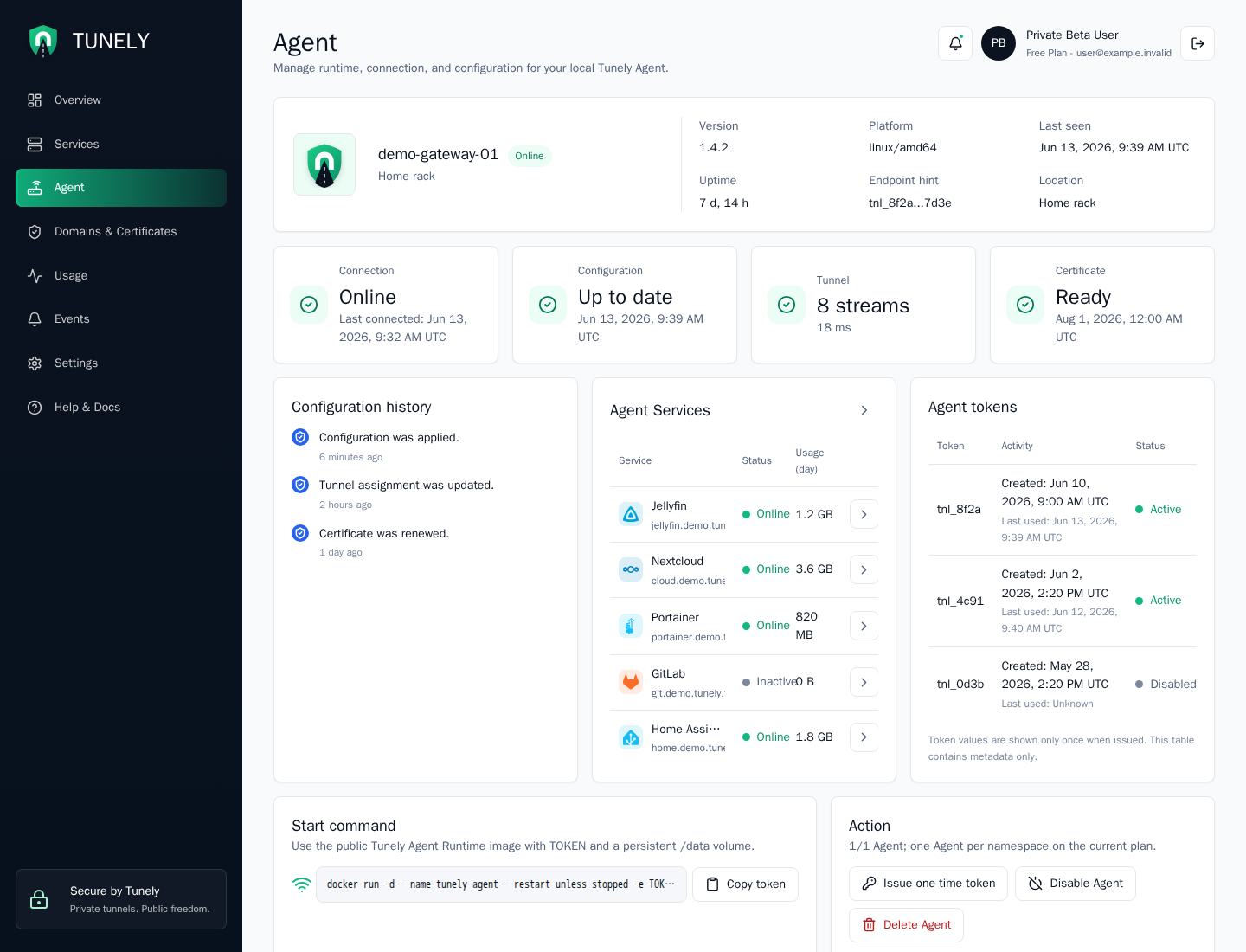
The top agent summary shows the configured agent name, location label, runtime version, platform, uptime, endpoint hint, and last-seen timestamp. This is the first place to check whether the dashboard is looking at the expected local installation.
The metric cards below summarize:
| Metric | What to check |
|---|---|
| Connection | Whether the agent is online and when it last connected. |
| Configuration | Whether the latest namespace configuration was applied. |
| Tunnel | Current active stream count and observed latency. |
| Certificate | Certificate readiness and expiration evidence. |
Understand Status
An agent can serve services only when it is running, connected outbound to Tunely, and able to reach the internal target addresses.
Important signals:
online: The agent is currently reporting.offline: Tunely has not seen a fresh report for a while.unknown: The agent exists but has not reached a stable state yet.
The exact dashboard presentation will be documented with screenshots as the app text settles.
Agent Services And Tokens
The Agent Services card lists services assigned to this agent. Use it to spot whether a service is attached to the wrong installation or whether a disabled service is still consuming a slot.
The Agent tokens card contains metadata only. Token values are shown only once when issued. If a token was lost, issue a new one and update the local agent installation.
Start Command
The start command card gives the Docker-style command shape for the public Tunely Agent Runtime image. It expects:
- a one-time
TOKENvalue from the dashboard - a persistent
/datavolume - a host that can reach the local services you want to publish
Token Handling
Agent tokens are secrets. Do not place them in repositories, tickets, screenshots, or shared chat logs. If a token was exposed, remove the agent or rotate the token.
Troubleshooting
If the agent is offline, check the local container or add-on first. Then verify the token, outbound connectivity to Tunely, and that the persistent data volume was not replaced unexpectedly.